Home › Forums › Forum Help And Other Tutorials › Can anyone help with a problem that I have with recording ? Mike W
- This topic has 23 replies, 8 voices, and was last updated 4 months, 1 week ago by
 Mike W.
-
AuthorPosts
-
-
May 12, 2026 at 12:45 pm #415666
I’ve missed the last 2 Challenges – first one because my old laptop expired and second one because I have a problem with my new laptop.
I normally record through an external webcam which records audio and video, but the problem is also experienced when I use the onboard HP camera. The problem is that on playback of the recording, the video is ok, but there is no audio for my guitar. However, if I announce the piece, my voice plays back but not the guitar. It’s quite bizarre but my laptop seems to be censoring me !
The problem remains with both of my amps; if I try to record and playback one of my old recordings; or even if I play a YouTube clip. I get Damian Bacci’s voice but no guitar.
On some occasions I get the first couple of notes but then that stops.
This problem never occurred on my old laptop.
I’m aware that the microphones are set to a particular frequency, but I don’t see why the issue has cropped up with my new laptop.
Any advice would be gratefully received,Mike
-
May 12, 2026 at 2:53 pm #415668
However, if I announce the piece, my voice plays back but not the guitar. It’s quite bizarre but my laptop seems to be censoring me !
I’m not sure what that means exactly. If you record with a webcam, it should record all the sound near the mic. If you use the onboard camera and mic, it should work the same way as the external camera. Maybe it automatically adjusting the sensitivity of the mic. Try just playing guitar only and see what happens on the recording. Outside of that, you will need to setup the mic levels so it works properly. There is usually settings for that.
Root note patterns >>> CAGED shapes >>> TRIAD'S. Just put in the work and watch your guitar skills soar.
-
May 12, 2026 at 11:15 pm #415688
Hey Mike, in all my days on earth I’ve never heard of such a thing. But I do know this: Almost no one uses a webcam or built-in laptop cam to record their music, due to extreme bad quality of audio and video. All of us AM members are hardworking musicians, and we deserve better than that. A common ordinary smartphone, on the other hand, is designed for that purpose and does a great job of recording video and audio. That’s what most people use, other than professional videographers and recording studios. Do you have a smartphone? If so, have you thought of trying that? You can buy a cheap tripod and cellphone mount adapter to hold your phone just where you want it. Use the front camera (selfie cam) and you can see yourself in the screen while you are playing.
Sunjamr Steve
-
May 14, 2026 at 2:25 pm #415830
Hi Steve, thanks for taking the trouble to reply. I’ve found out that in fact the problem is something that Microsoft have introduced in Windows 11. Apparently it’s caused a lot of problems for online music teachers and students, I find it unbelievable that they’ve introduced a default setting that reduces non-voice sound by 80%. They don’t mention it till you start digging deep and can then turn it off. I hate Microsoft!
With regard to using a mobile phone – my android reproduction is no better than the webcam (which to be honest I think is OK). However, I shall try my wife’s iPhone to see if that’s any better. Immediate panic is over – thanks again – Mike
-
-
May 13, 2026 at 5:46 am #415701
Mike
I was gonna write what Sunjamr wrote… no need. He summed up what most of us do. Your phone will work infinitely better than your web cam. In fact, that is what I do, then I dump my recorded file into iMovie and edit it. You can plug into your computer but you need an interface like a Scrarlett Solo or something similar. Maybe this is a good stumbling block for you to overcome in the hope that it is an opportunity to radically improve the quality of your audio/video.John
-
May 14, 2026 at 2:28 pm #415832
Hi John, Thanks for taking the trouble to reply.
I’ve found out that in fact the problem is something that Microsoft have introduced in Windows 11. Apparently it’s caused a lot of problems for online music teachers and students, I find it unbelievable that they’ve introduced a default setting that reduces non-voice sound by 80%. They don’t mention it till you start digging deep and can then turn it off. I hate Microsoft!
I shall follow up on alternative methods of recording, ie phone or DAW, but I have to admit I like (what used to be) the simplicity of a webcam.
Thanks again,Mike
-
-
May 13, 2026 at 7:07 am #415709
I just assumed that he wasn’t using a smart phone. Not everyone does, but most do.
Root note patterns >>> CAGED shapes >>> TRIAD'S. Just put in the work and watch your guitar skills soar.
-
May 13, 2026 at 7:10 am #415710
I’m going to throw in a hunch but only because the problem intrigues me. I also believe Steve and John’s advice is the right way to go.
My hunch is that post Covid and the advent of home working/zoom meetings etc most laptop webcams are used solely for online meetings. For those, mics automatically get muted when the laptop thinks you’re not speaking to prevent feedback and echos bouncing around your meeting. I think this all used to be in the meeting software but windows style operating systems have got to the level of patronisation that it’s probably embedded in the OS. As I say, just a hunch!-
May 14, 2026 at 2:33 pm #415833
Hi Andy,
It looks like your hunch is spot on – it appears that Windows 11 have introduced a feature that reduces non-voice sound by 80% as a default. You need to dig deep to find out how to turn it off. Patronising is rather a mild word to describe their actions.
Lots of on online music teachers and pupils have been inconvenienced.
Thanks again for your inspired hunch,
Mike
-
-
May 13, 2026 at 8:39 am #415723
I’m going to throw in a hunch but only because the problem intrigues me. I also believe Steve and John’s advice is the right way to go.
My hunch is that post Covid and the advent of home working/zoom meetings etc most laptop webcams are used solely for online meetings. For those, mics automatically get muted when the laptop thinks you’re not speaking to prevent feedback and echos bouncing around your meeting. I think this all used to be in the meeting software but windows style operating systems have got to the level of patronisation that it’s probably embedded in the OS. As I say, just a hunch!My web cam on windows 11 does not do this, so I doubt the OS has anything to do with it. I did just get an update yesterday and have not tested it after the update, but I still doubt it. The idea of automatic muting for noise cancelling purpose would only be a user selected option based off of specific webcam software being used. I have never encountered that option, but to just mute the mic when no one is speaking has to be a user controlled function or option. It is true that the purpose of the webcam is primarily for face to face communications with others, which is why it’s a bad idea to use it for recording music in general, but we’ll just have to wait for Mike W’s explanation why he chose that method over a smart phone.
Root note patterns >>> CAGED shapes >>> TRIAD'S. Just put in the work and watch your guitar skills soar.
-
May 14, 2026 at 2:37 pm #415834
Hi Michael,
Thanks for taking the trouble to follow up on this.
It seems as if you’ve been lucky to avoid this problem – I was given a set of instructions to follow and the reduction of non-voice sound by 80% is indeed a default on my new laptop using Windows 11.
Fortunately things are now back to normal.
Thanks again for your input,Mike
-
-
May 14, 2026 at 2:39 pm #415835
Hi Steve, thanks for taking the trouble to reply. I’ve found out that in fact the problem is something that Microsoft have introduced in Windows 11. Apparently it’s caused a lot of problems for online music teachers and students, I find it unbelievable that they’ve introduced a default setting that reduces non-voice sound by 80%. They don’t mention it till you start digging deep and can then turn it off. I hate Microsoft!
With regard to using a mobile phone – my android reproduction is no better than the webcam (which to be honest I think is OK). However, I shall try my wife’s iPhone to see if that’s any better. Immediate panic is over – thanks again – MikeWould you be so kind as to post a source to the info you say you found about Windows11 causing the issue you are having. I could find no such thing. I did find that there is a setting for the microphone driver that will either allow or deny other software applications from adjusting or tampering with the microphone levels. This however has nothing to do with Windows11 at all. It’s a driver setting for your specific hardware or from the software you use with your camera and mic which again has nothing to do with windows OS itself.
So if you could post links to that information that you found, I would appreciate it very much.
Root note patterns >>> CAGED shapes >>> TRIAD'S. Just put in the work and watch your guitar skills soar.
-
May 15, 2026 at 4:39 am #415867
Hi Michael,
As requested, the link is
https://learn.microsoft.com/en-us/answers/questions/4280130/windows-11-mic-recording-speaking-voice-but-not-muFrom your subsequent message it looks like you may have already found this.
Thanks for your interest,
Mike
-
-
May 14, 2026 at 4:11 pm #415839
Thanks for filling me on that Mike. Now I understand what the issue was. That is actually a default setting in the Windows communication software that should only come into play if you receive a Voip call or the OS detects that you are receiving a voip call. If it gets a false positive, then I suppose it could reek havoc with other applications. That has been around since Windows 7. I never had an issue with it, but I don’t use voip calls of any kind either.
I assume this is the setting you are talking about. If not, maybe it is something special to HP Laptops.
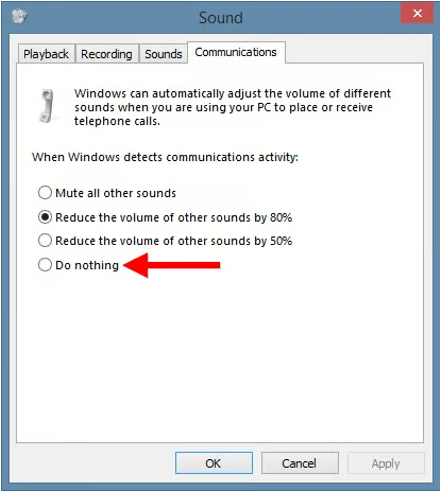
Wait a minute, I just found this other feature that is a Windows 11 thing. That must be what you were talking about.
Voice Focus in Windows 11
Windows 11 includes a feature known as Voice Focus, which is designed to reduce background noise and enhance voice clarity. This feature is part of the Windows Studio Effects and can significantly improve audio quality during calls and recordings.
Root note patterns >>> CAGED shapes >>> TRIAD'S. Just put in the work and watch your guitar skills soar.
-
May 14, 2026 at 8:38 pm #415848
It’s really not too much trouble or money to go the next step.
When I started recording myself for AM I used my Android phone. It was OK, but the quality was pretty poor compared to the mix you get with an interface and DAW. I picked up a iRig 2 (google it) for about $50 bucks and plug it into an older iPad. I use Garage Band on the iPad (free). So really, for pretty little cash, you can dramatically improve your sound quality. If you’re playing an acoustic without electronics you’ll need a microphone too. Record video on your phone or webcam, and then mix the sound and video in any video editing software you like. Yes, more work than just dropping your phone video out to YouTube, but oh, so much better quality.
-
May 15, 2026 at 4:48 am #415868
Hi Michael,
Thanks for your input. I have to confess that I’ve neglected the mechanics of recording – as soon as I hit a problem (eg interference when using a DAW) I just drop it and move on to something more interesting. That’s why I’ve been using, for some time, the simplest approach – external webcam with its own microphone. I know it’s not the best quality but I thought it was ok.
This episode has given me some food for thought so I shall be looking into this aspect more closely.
I appreciate you taking the time to provide this advice,Mike
-
-
May 15, 2026 at 7:38 am #415880
Hi Mike,
As you’ve been discussing, there are a number of recording options open to us these days. Over the past 5 odd years I’ve used my iPad to record video and Focusrite to record sound, merged together in Adobe Premiere, all with reasonable results.I started years ago recording using a mobile phone but the options available to post edit sound with a DAW (in my case Ableton) were just too inviting to ignore.
Richard
-
May 15, 2026 at 3:11 pm #415910
Hi Richard,
Thanks for the advice. Coincidentally I’ve just dug out my Presonus DAW to see if I can get it working – I gave up on it several years ago. Today I’ve tried my wife’s iphone and ipad and the audio play back is not as good as the external webcam, although the video quality is slightly better.
I need to have more perseverance and follow things through rather than give up and revert to the old methods. The problem is that to do so eats into my playing time.
Any way, thanks for your input,
Mike
-
-
May 15, 2026 at 10:44 am #415897
Great to hear you’ve got it sorted quickly, Mike.
I can’t say I’m surprised after witnessing a litany of such things over the years with windows.
I don’t know who’s responsible, Microsoft or the laptop manufacturers but it seems that new features, albeit useful, are too often defaulted to benefit some Preconceived, average, low power user profile that probably doesn’t exist and in blind disregard to every other kind of user. The worse crime is hiding it. Its unbelievably frustrating and one of the reasons I ditched windows in favour of Apple Mac as soon as I retired and could choose my own destiny.This one was pretty bad but the worst one I experienced was on a new, top of the range, quad core Lenovo Thinkpad which was configured to use only 90% of the available cpu power, even when plugged into a power supply!
It required a secret mantra to be typed at the command line to get it to use all the CPU.
I can’t begin to understand what the thinking was behind that decision 😳🤦♂️Anyway, good to hear your back recording and will look forward to the results in due course, whatever you decide to do.
Cheers
Andy-
May 15, 2026 at 3:17 pm #415911
Many thanks Andy. I was really impressed with you pinpointing the problem exactly. Like you, I cannot believe some of the things that Microsoft do when they make changes for the flimsiest (if any) reasons. Their designers should be forced to live in the real world for a while.
Thanks again,Mike
-
-
May 15, 2026 at 2:14 pm #415908
Great to hear you’ve got it sorted quickly, Mike.
I can’t say I’m surprised after witnessing a litany of such things over the years with windows.
I don’t know who’s responsible, Microsoft or the laptop manufacturers but it seems that new features, albeit useful, are too often defaulted to benefit some Preconceived, average, low power user profile that probably doesn’t exist and in blind disregard to every other kind of user. The worse crime is hiding it. Its unbelievably frustrating and one of the reasons I ditched windows in favour of Apple Mac as soon as I retired and could choose my own destiny.This one was pretty bad but the worst one I experienced was on a new, top of the range, quad core Lenovo Thinkpad which was configured to use only 90% of the available cpu power, even when plugged into a power supply!
It required a secret mantra to be typed at the command line to get it to use all the CPU.
I can’t begin to understand what the thinking was behind that decision 😳🤦♂️Anyway, good to hear your back recording and will look forward to the results in due course, whatever you decide to do.
Cheers
AndyI’m on the opposite side of that opinion. There are times when Microsoft does something that upsets it’s user base due to updates or changes, but overall my experience as a user has been phenomenal. Like everyone else, it is very upsetting to have to deal with changes of any kind, but especially when changes are made to something that already works perfectly fine. Security updates can sometimes break stuff, but security is too important now a days not to be mindful of it.
I inherited all my fathers Apple products and I cannot stand them. They just sit there unused. They work so differently, it’s like trying to communicate in another language. All my keyboard shortcuts don’t work, so nope, I’ll never buy into Apple anything. Total garbage.
On the other hand, I do like many different Linux distributions that are very different from working with Windows. But this is mainly due to having worked with many different versions over the years and having in depth knowledge in how the whole OS works. And I love the command line simply because that’s where all the power lies for those that know how to use it.
Root note patterns >>> CAGED shapes >>> TRIAD'S. Just put in the work and watch your guitar skills soar.
-
May 15, 2026 at 3:24 pm #415913
Thanks Michael,
It’s been a very frustrating time but at least now I’ve returned to the status quo.
It’s been useful in that I’ve been forced into looking beyond the computer screen and also to start considering other methods of recording.
Thanks for your input,
Mike
-
-
May 16, 2026 at 12:18 pm #415971
I agree with what Andy was talking about. I was a computer network administrator for 25 years dealing with all the troubles of Microsoft products starting with MS DOS 3.2 through Windows 11. When I retired I ditched Microsoft and bought into the Apple ecosystem.
The switch was pretty easy and I never looked back. Although it’s kind of expensive it just works. Sometimes I have to research Google but I’ve always quickly found an answer unlike Microsoft which could take days to sort out.
Joe
The sight of a touch, or the scent of a sound,
Or the strength of an Oak with roots deep in the ground.
--Graeme Edge-
May 18, 2026 at 8:43 am #416161
Hi Joe,
Thanks for your response. I suppose I should have done a bit of research before buying into Windows again. The consensus certainly suggests a change to Apple would have made more sense. Next time, maybe.
Mike
-
-
-
AuthorPosts








- You must be logged in to reply to this topic.
