Home › Forums › Beginner Guitar Discussions › Running AM MP3s into Interface?
- This topic has 7 replies, 6 voices, and was last updated 8 years, 7 months ago by
 GnLguy.
-
AuthorPosts
-
-
August 27, 2017 at 10:35 pm #78900
I am not the sharpest tool in the shed when it comes to using pcs and I am sitting here scratching my head trying to learn how to take one of Brian’s backing tracks and to run into Reaper so that I can use it to listen to and have it record with my guitar lead. I am able to find the MP3 file on the pc and I guess now I import that file to reaper some how and then will Reaper play it along with my lead? I tried doing a search on AM for the subject but didn’t see it but I am sure that it is there. You don’t have to explain it step by step but if you can point me in the right direction I would be great full for any help that you could render and thanks,
Gary.Boats'Blues.
-
August 28, 2017 at 12:38 am #78909
I just learned how to do that myself. Here it is:
Step 1
Launch Reaper.
Step 2
Click “Track,” then “Insert New Track.”
Step 3
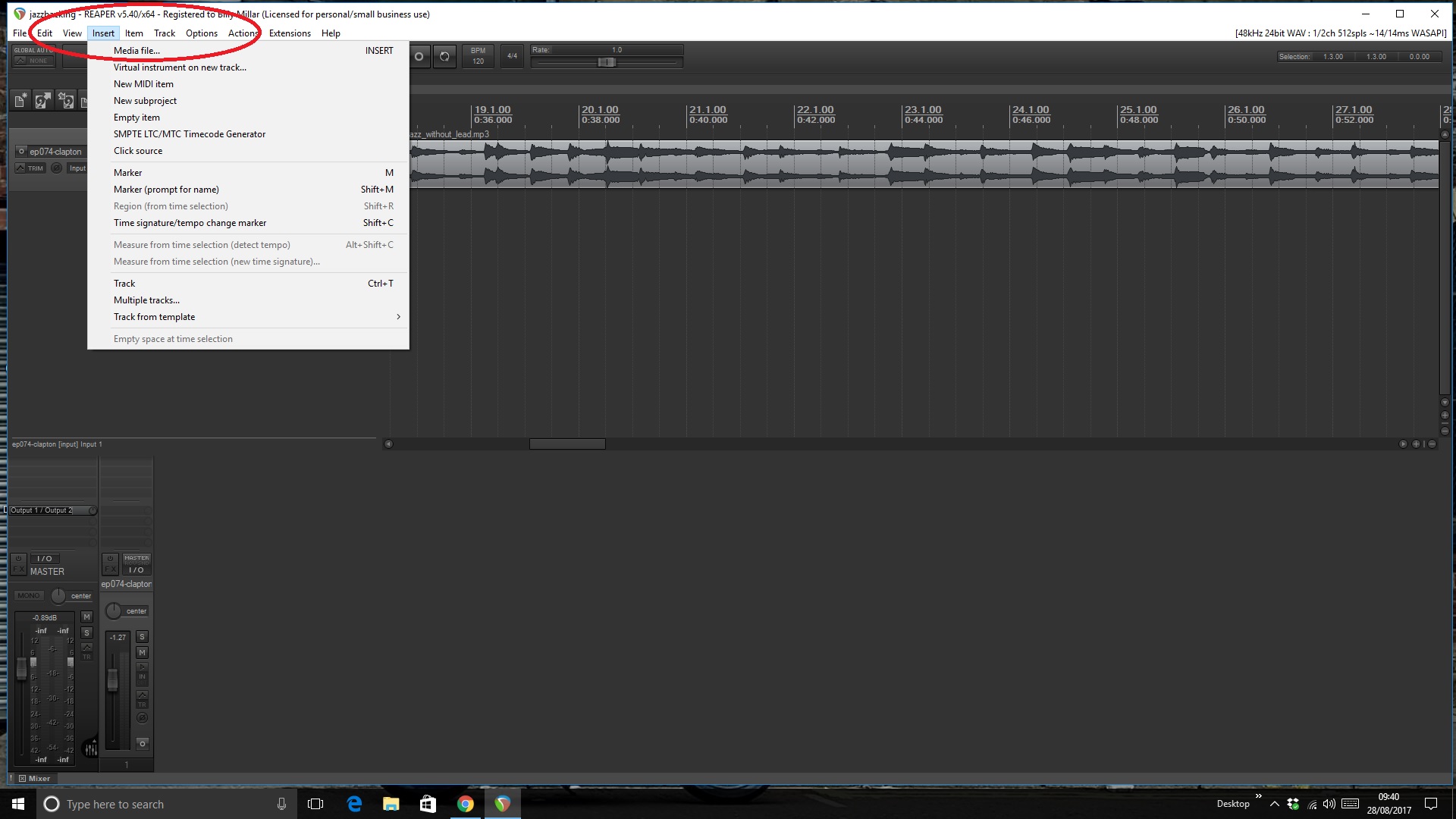
Click “Insert” in the top menu bar, then click “Media File.”
Step 4
Navigate to the MP3 file you want to import into Reaper. Double-click the file to add it to the audio track. Repeat the process for any other MP3 files you want to import.
Sunjamr Steve
-
August 28, 2017 at 1:53 am #78916
Sunjmar is right but it’s nice to have a video of the full process?
This video explains a lot &
there’s loads more vids there!
I’ve found a very important part is saving the the tracks in their OWN folder (You can name the folder by the lesson No?)it makes things very easy to find later?, & keeps a tidy file system?.
https://www.reaper.fm/videos.php#CPfpvviWsisI Started out With Nothing & I've Still got most of it left. (Seasick Steve)
-
August 28, 2017 at 3:45 am #78922
I am not the sharpest tool in the shed when it comes to using pcs and I am sitting here scratching my head trying to learn how to take one of Brian’s backing tracks and to run into Reaper so that I can use it to listen to and have it record with my guitar lead. I am able to find the MP3 file on the pc and I guess now I import that file to reaper some how and then will Reaper play it along with my lead? I tried doing a search on AM for the subject but didn’t see it but I am sure that it is there. You don’t have to explain it step by step but if you can point me in the right direction I would be great full for any help that you could render and thanks,
Gary.Morning Gary, it really is very easy to do and both Steve and Jiffy are correct, Personally I make a folder to house all my backing tracks( it just keeps everything tidy)…anyway, this is what you want.
..Billy..
-
August 28, 2017 at 5:49 am #78932
Some optional info, but, good info to know…..
You would also want to lock your backing track to prevent accidental edits. This video explains in detail locking..
Don't practice till you get it right, practice till you can't get it wrong.
-
August 28, 2017 at 7:57 am #78940
Kenny’s videos are a great help to everybody!.
I Started out With Nothing & I've Still got most of it left. (Seasick Steve)
-
August 28, 2017 at 9:23 am #78952
Thanks to all for your help with the MP3 import. You are right about naming them and giving them their own folder. I had never thought about locking these files but it sure makes sense to do so because of the work that is put into them and in my case forgetting what work was put in a week ago and the loss of ideas for the track. I can see that once a person learns this software that it could be almost limitless if a guy is talented in running it. Thanks again guys for your help,
Gary.Boats'Blues.
-
August 28, 2017 at 10:02 am #78966
Hey Gary
Sent you a PMf
-
-
-
AuthorPosts





- You must be logged in to reply to this topic.
