Home › Forums › Beginner Guitar Discussions › How to play with a jam track?
- This topic has 8 replies, 5 voices, and was last updated 9 years, 9 months ago by
 Jdub.
Jdub.
-
AuthorPosts
-
-
June 30, 2016 at 1:50 pm #44585
Hello everyone, I need some advice on jam track playing. My computer speakers are way to quite to use. I was doing some research on a looper and came across one that you can load jam tracks onto it. Would this be the way to go?
Thanks for any help…
-
June 30, 2016 at 2:03 pm #44587
You could always put the jam track on your phone or other MP3 player and use headphones. You could use headphones for the computer too and just have one headphone on and one off. Some amps will let you put jam tracks in them or have an 1/8″ aux input for a phone or other audio device.
You could also go real old school and burn a CD and play it on your stereo if you have one. I have not used a pedal that stores jam tracks in it. The easiest way for me is to use your DAW and plug directly into your interface and run both the jam track and your guitar through it even if you are not recording. An example of this is here:
-Bryce
Anchorage, Alaska -
June 30, 2016 at 3:19 pm #44594
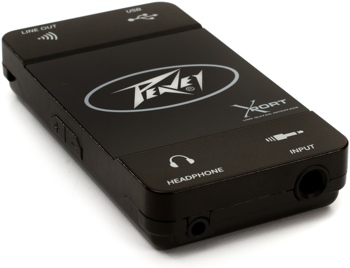
http://www.sweetwater.com/images/items/350/XPortGuitarUSB.jpg
Bryce will this work to plug my guitar into my computer? -
June 30, 2016 at 4:47 pm #44597
I have tried a few ways, mp3 player through my amp, CD played on a cd player/ps4/pc and i also have the jam tracks on my Kindle fire.. I have my lessons on there too( well the free youtube ones)which i find handy as I can go over a lesson while sitting in my taxi waiting for work… the only problem i seem to have now is counting myself in…
..Billy..
-
June 30, 2016 at 4:51 pm #44598
I don’t have any friends nearby to jam with, so the first thing I did when joining ActiveMelody is figure out how to get a nice loud way of playing the jam tracks. And like Bryce points out, there are several ways to do it, depending on what gear you have and how much you want to spend. It also matters whether you are into acoustic or electric guitar. For acoustic, I would just buy better computer speakers. I have an excellent sounding pair of Bose computer speakers bought from Best Buy for $100. For electric, most amps have an input for stereo mini-jack cables. Even my tiny Roland battery powered portable amp has such an input. If yours does also, start there. Figure out how to feed the jamtrack into it, and you’re in business. You could go from the headphone output on your computer to the mp3 input on your amp. All my ActiveMelody and other jam tracks are stored on my iPad and iPhone, so most of the time I just connect either one into my amp. If I want to record onto my laptop, then I connect my laptop to my amp so I can hear my electric guitar plus the jamtrack through my amp as I’m playing. I often feed my guitar into my computer using an Apogee Jam gadget. I think most people now use the iRig, which does the same thing. Maybe the iRig is a few dollars cheaper.
Next, you’re going to want to start looping your jam tracks so you don’t have to stop playing and re-start the jam track to keep playing. When you get to that stage, throw the question out to the forum and you’ll get lots of ideas. Using a looping pedal is not really a good option, unless you want to make your own jamtrack on the fly. Software that can slow down the jamtrack and create loops is the answer.
Sunjamr Steve
-
June 30, 2016 at 5:52 pm #44603
I didn’t know this would be so confusing, Im not a tech guy at all. I feel like my head is gonna explode…HaHa…My Amp is a simple Vox AC10 with a instrument input and external speaker output. so not sure how to get a jam track to play through that. I checked into the iRig and I installed garage band on my mac so i think I will try that for now maybe get some external speakers so its louder. Figure out the amp thing later.
-
June 30, 2016 at 9:16 pm #44610
I play my laptop from the headphone jack with an RCA adapter. You knpw the one with white and red ends? This goes into the RCA inputs on mixer (behringer xenyx 802) about 60$.
I Have labeled that input “computer”. I also plug my amp into the mixer with XLR cable and labeled that one “amp”. There is room for a few inputs i.e. mics, etc.
Now with my particular amp I can power soak from 18 watts to 5 watts down to 1 watt and finally silent operation (DI) ,which works great in the evening when I use a headphone from the mixer.
Just how I did it with not too much trouble. Hope that can help.
Cheers
Steve
-
June 30, 2016 at 9:35 pm #44612
@jdubjam: I’m not familiar with that Peavey product but it appears to be an interface that would allow you to connect to you computer via USB.
If I were you I would spend a little extra cash and get something with a gain setting for the channel. The Peavey unit doesn’t have one.
A couple examples:
1) http://www.sweetwater.com/store/detail/iRigHD
2) http://www.sweetwater.com/store/detail/Jam96K
3) http://www.sweetwater.com/store/detail/ScarlettSoloG2
I personally have not had good recording results with an interface without a gain control. I currently use the older version of this:
http://www.sweetwater.com/store/detail/Scarlet2i2G2
I also own the Apogee Jam 96K and love it. I just out grew it. I still have it and it’s great for mobile recording but if I were to buy another I would get one that has a combo XLR / 1/4″ jack like this one: http://www.sweetwater.com/store/detail/iRigPro
That’s my two cents. Take it for what it is worth.
-Bryce
Anchorage, Alaska -
June 30, 2016 at 10:19 pm #44615
Thanks everyone, I just ordered the iRig HD. Today is the last day that it comes with Free Amplitube 4 Deluxe Software. So I will try that out I might like it better than Garage Band. It may take a little while to figure everything out as I mentioned before I’m not very tech savvy. I think playing with jam tracks will improve my playing. I usually skip the lessons with jam tracks but now its time to get to work..
-
-
AuthorPosts





- You must be logged in to reply to this topic.